
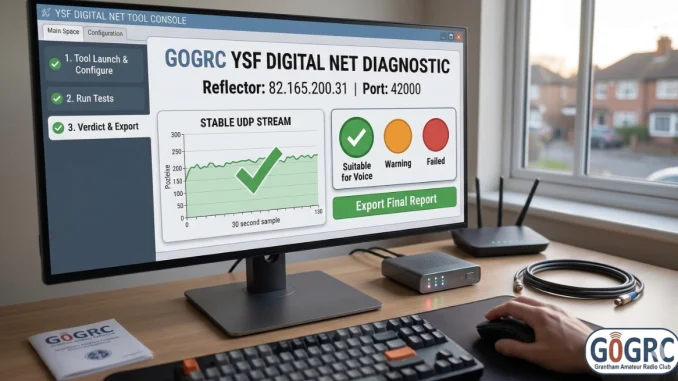
Repost from g5mdc.uk
If you have ever had trouble connecting to the network or found yourself cut off mid-sentence by an unexpected “timeout” while using your YSF hotspot on the Grantham Reflector, you are certainly not alone. Whether you are a seasoned operator or a newcomer, these interruptions can be incredibly frustrating.
This guide outlines the technical causes of these dropouts, details the server-side network performance benchmarks, and introduces the YSF Digital Net Tool—a diagnostic utility built to help you natively identify and resolve local connection issues for a stable transmitting experience.
1. Understanding Network Dropouts
Connection Issues & Unexpected Cutoffs
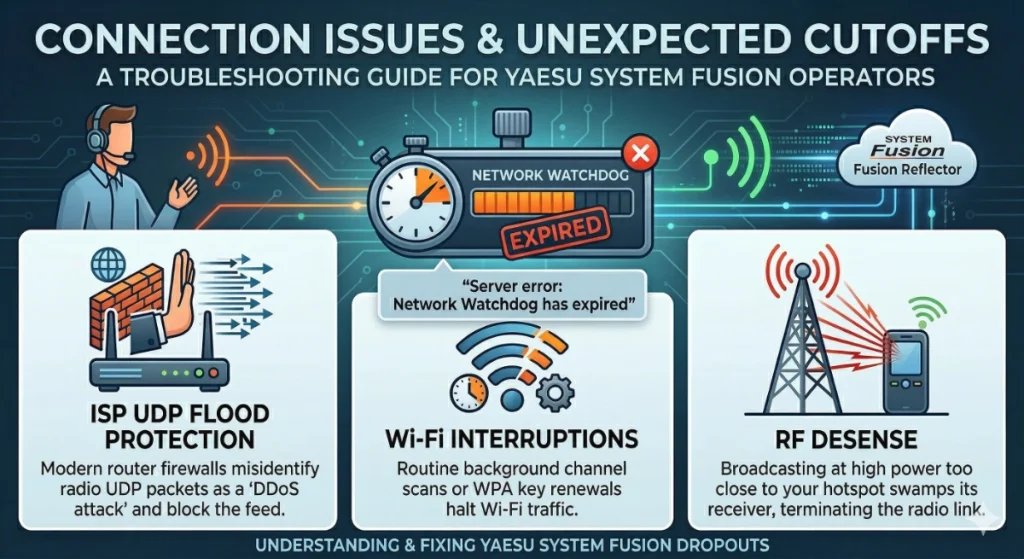
A common issue reported by operators involves initial trouble connecting to the system or experiencing an abrupt cutoff during a transmission. From the server’s perspective, these dropouts typically trigger a “Network Watchdog has expired” error.
The YAESU System Fusion (YSF) protocol was originally designed for real-time Radio Frequency (RF) transmission rather than traversing the complex routing of the public internet. Because the reflector mimics a physical digital repeater, it relies on a high-precision watchdog timer to clear the channel the moment you release your PTT. If the server stops receiving a consistent stream of packets from your hotspot for even a brief moment, it assumes the transmission has concluded and terminates the stream to keep the channel available for others.
Digital Radio Streams vs. Commercial VoIP
Unlike services such as WhatsApp or FaceTime—which use intelligent buffering to smooth out network hiccups—digital amateur radio streams consist of raw, unbuffered UDP data. Your hotspot sends a constant stream of packets directly at the server. Any micro-interruption in your home network violates the watchdog threshold, causing an instant disconnection.
The primary culprits for these dropouts are strictly local:
- ISP UDP Flood Protection: Modern router firewalls (often supplied by ISPs like BT, Sky, or Virgin Media) may misidentify the relentless stream of radio UDP packets as a malicious “DDoS attack” and forcefully block your feed.
- Wi-Fi Interruptions: Routine background channel scans or WPA network key renewals can halt Wi-Fi traffic for a short window—just long enough to trigger the server’s watchdog.
- RF Desense: Broadcasting at high power too close to your hotspot can swamp its receiver, terminating the radio link before the audio ever reaches the internet.
2. Server Benchmarking & iperf3 Results
To permanently rule out the Grantham reflector server, ysf.garc.org.uk (82.165.200.31) as the point of failure, rigorous Reverse UDP Stress Tests were conducted via iperf3, the telecommunications gold-standard for VoIP network diagnostics. The server was forced to simulate continuous, ultra-heavy voice streams.
The Benchmark Results:
| Metric | Result |
|---|---|
| Duration Sustained | Full test duration completed with zero abrupt terminations |
| Network Jitter | Near-perfect timing with negligible variance |
| Packet Loss | 0.0% |
Conclusion: The hosting infrastructure for the G0GRC reflector is excellent. It does not rate-limit, shape, or passively discard UDP voice packets. Since the server performs relentlessly under stress, any sudden dropouts or connection difficulties are definitively originating locally between your radio, your local hotspot, and your ISP router.
3. The Importance of Testing
Because local dropouts are the true bottleneck, proactive end-to-end network testing is vital. Without precise, measurable metrics, troubleshooting a dropout on your end is sheer guesswork.
Testing empowers you to:
- Establish a Baseline: Know the exact quality of the stream reaching the reflector before modifying router settings.
- Prove Network Hardware Fixes: Directly compare how much an Ethernet cable improves stability compared to standard residential Wi-Fi.
- Validate ISP Changes: Measure if disabling “Advanced DDoS Protection” on your router successfully mitigates artificial cutoffs. Enabling QOS to prioritise VOIP traffic (not all routers/modems support this)
4. The Solution: YSF Digital Net Tool
To make diagnostic data accessible and empower operators, we have created the YSF Digital Net Tool (also referred to as the YSF Ping diagnostic tool).
📡 What is this tool?
This is a lightweight, cross-platform diagnostic desktop application built to test and measure network connection telemetry over the YSF protocol. It generates native UDP YSFS diagnostic ping packets—accurately mimicking the exact transport payload of active digital radio traffic—without interfering with ongoing C4FM voice data (QSOs) flowing through the server.
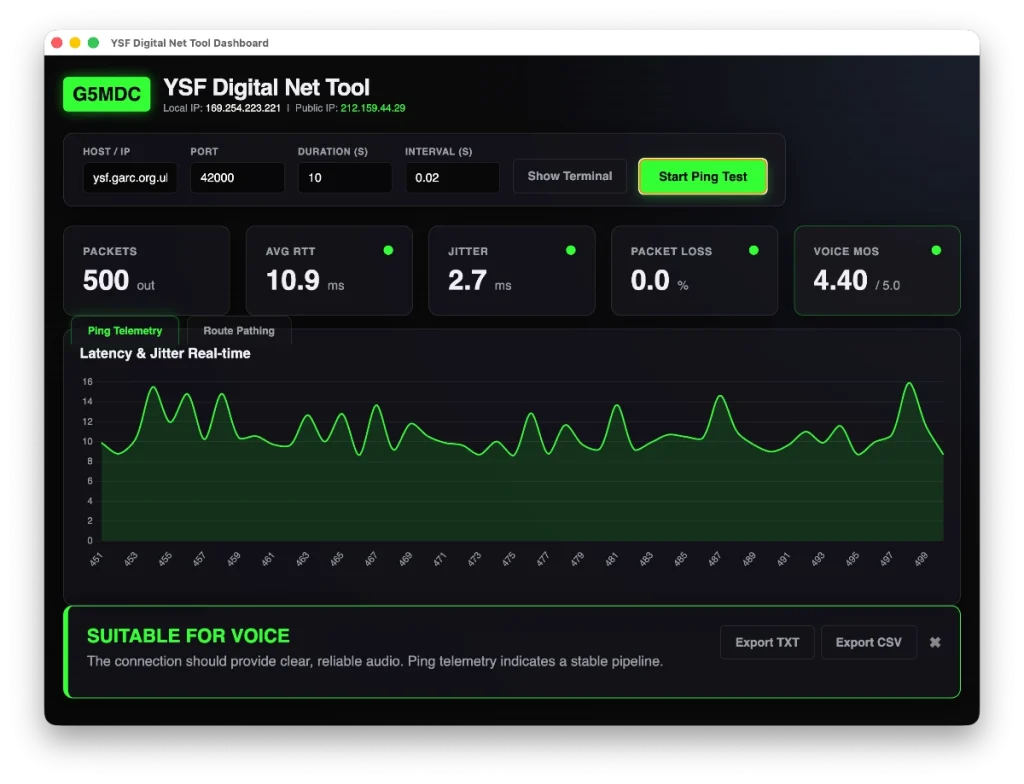
It presents real-time data on:
- Round Trip Time (RTT): Basic latency measurements.
- Jitter: Latency consistency and variance between individual frames.
- Packet Loss: Crucial indicator of dropped UDP datagrams.
- Mean Opinion Score (MOS): An ITU standardised 1-5 rating on estimated voice quality.
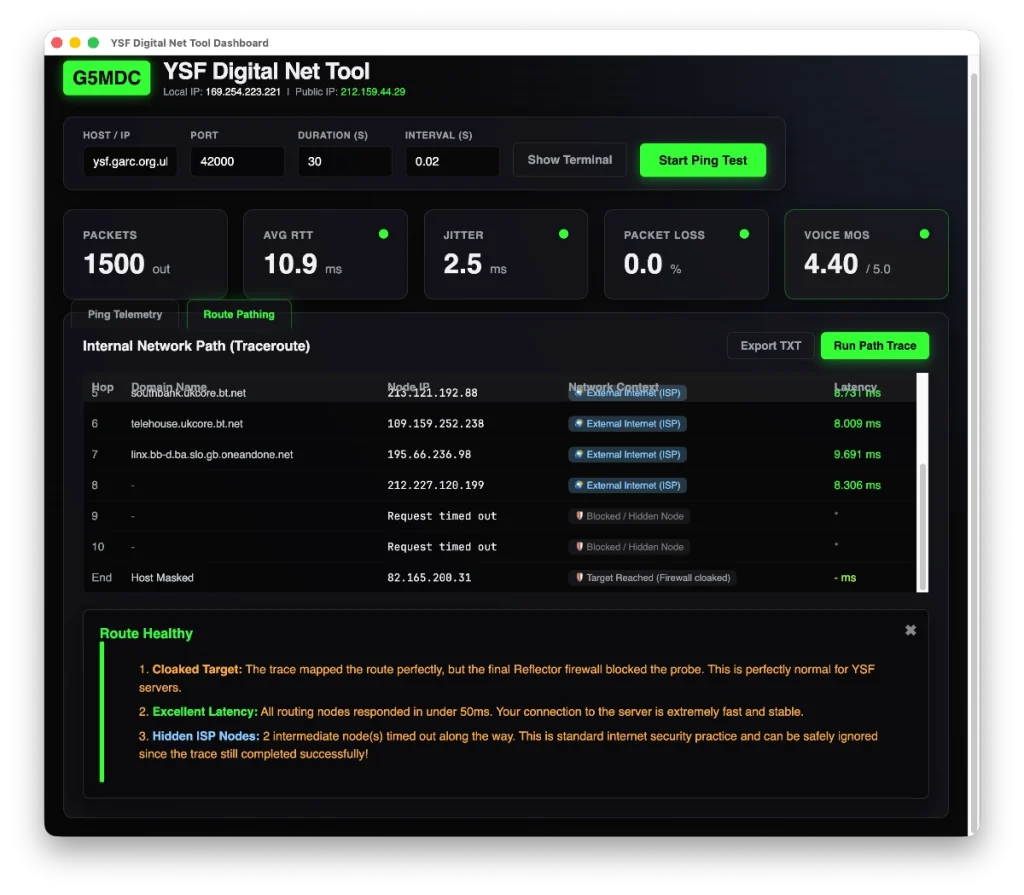
- Internal Network Traceroute: Identifies exactly where packet loss or latency occurs across the physical network hops up to the reflector server.
Download the YSF Digital Net Tool
5. Advanced Features & Anti-Abuse
🛡️ Anti-Abuse Protections
To ensure this utility cannot be misused as an aggressive UDP flood tool:
- The backend strictly enforces a minimum ping interval, making it mathematically unviable to generate high-rate traffic against any target.
- Tests default to a standard duration and include a hard maximum runtime per session, preventing sustained or unintentional network flooding.
- Additionally, the effort required to reverse engineer and repurpose this tool for DDoS-style activity would far outweigh any benefit, as significantly easier and more effective methods already exist—making this approach impractical and not worthwhile.
📋 6. How to Run a Diagnostic Test
Follow these simple steps to analyse your network connection:
- Launch the Tool: Open the YSF Digital Net Tool on a computer connected to the same network as your hotspot.
- Enter Reflector Details: Input the target server’s IP Address (e.g.,
82.165.200.31) and Port (usually42000). - Run a Telemetry Test: Click Start to begin simulating the real-time UDP stream. Allow the test to run for the default 30 seconds to gather an accurate packet sample.
- Run a Route Analysis: Open the Traceroute view to map the physical network hops and identify exactly where latency bottlenecks actually occur.
- Review the Verdict: Check the final analysis panel (🟢 Suitable, 🟠 Warning, or 🔴 Failed) to determine if your internet connection is stable enough for digital voice.
- Export Your Report: Use the Export buttons to save a copy of your results, perfect for sharing on amateur radio forums if you need further troubleshooting assistance.
📊 7. Understanding the Results
When a test completes, the tool provides a verdict to help interpret connection quality:
- 🟢 SUITABLE FOR VOICE: Connection is highly stable with minimal jitter and packet loss. This connection will provide clear, reliable audio.
- 🟠 WARNING: POTENTIAL ISSUES: Thresholds breached for latency or jitter. You will likely experience audio dropouts, “underwater” artifacts, or robotic delays.
- 🔴 FAILED: No Connection: Zero packets returned. This highlights a total failure to reach the reflector, likely due to an incorrect address or a firewall blocking UDP traffic.
🗺️ 8. Traceroute Diagnostic Engine
While standard ping telemetry proves whether your packets are dropping, the integrated Route Pathing feature tells you where:
- Hooks natively into the OS without requiring root access.
- Bypasses hidden firewalls dynamically.
- Assigns Network Contexts (Home Router, Local Internal Network, External Internet) to every hop.
- Generates a real-time Route Analysis highlighting connection viability.
9. Troubleshooting Hardware & Best Practices
In a post following on from this, I will discuss possible problems with the hotspot and radio that can cause the dropout issues and best practices to maximise the connection quality. Identifying hardware bottlenecks—such as power supply fluctuations, antenna positioning, or firmware configurations—is the next step in ensuring your digital setup remains rock-solid during long transmissions.
Supporting Our Community
At GARC, we view these technical challenges as a valuable STEM learning opportunity. Our server and software have already been optimised, and this remains an ongoing process as we continue refining performance to make the reflector more resilient to minor internet interruptions—helping both Foundation members and seasoned operators enjoy a smoother experience.
Don’t let a timeout dampen your enthusiasm for digital radio.” If you’re still having issues, bring your gear along to the next club night and we’ll help get everything back to peak condition!
⚠️ Beta Notice & Future Updates
Please note that this initial version of the Diagnostic Tool is currently in BETA and is only available to GARC members on request via whatsap. Diagnostic thresholds and UI features may be adjusted as further data is gathered. Bespoke versions for DMR and D-STAR networking are planned for future release.
© Copyright 2026 Mark Cressey G5MDC
Leave a Reply